A £199 streaming box, in a world where perfectly decent sticks cost £35. On paper that sounds like money set on fire.
I thought so too. Then I lived with the Apple TV 4K for [09 months]. Now I get why owners rave about it. This is the fastest, calmest, least annoying streamer I’ve ever plugged into a TV.
Whether it’s worth your money is a different question. And in mid-2026 there’s a twist: Apple’s replacement box is expected within months. So this review answers both things — is it good, and should you buy it right now.
Quick Verdict: Buy, Skip, or Hold On?
Buy it if you want the best streaming experience money buys today — especially in an iPhone household. Apps open instantly and the home screen carries zero adverts. The picture is superb, and it doubles as a smart-home hub. At 9.4/10, it’s the highest score I’ve given a streamer.
Skip it if you just want Netflix on a budget. A Fire TV Stick 4K Max or a clearance Chromecast does the basics for a third of the price.
And hold on if you’re an Apple enthusiast — a new model is expected around autumn 2026. I explain who should wait below.
Check Today’s Apple TV 4K Price on Amazon →My Score: 9.4 / 10
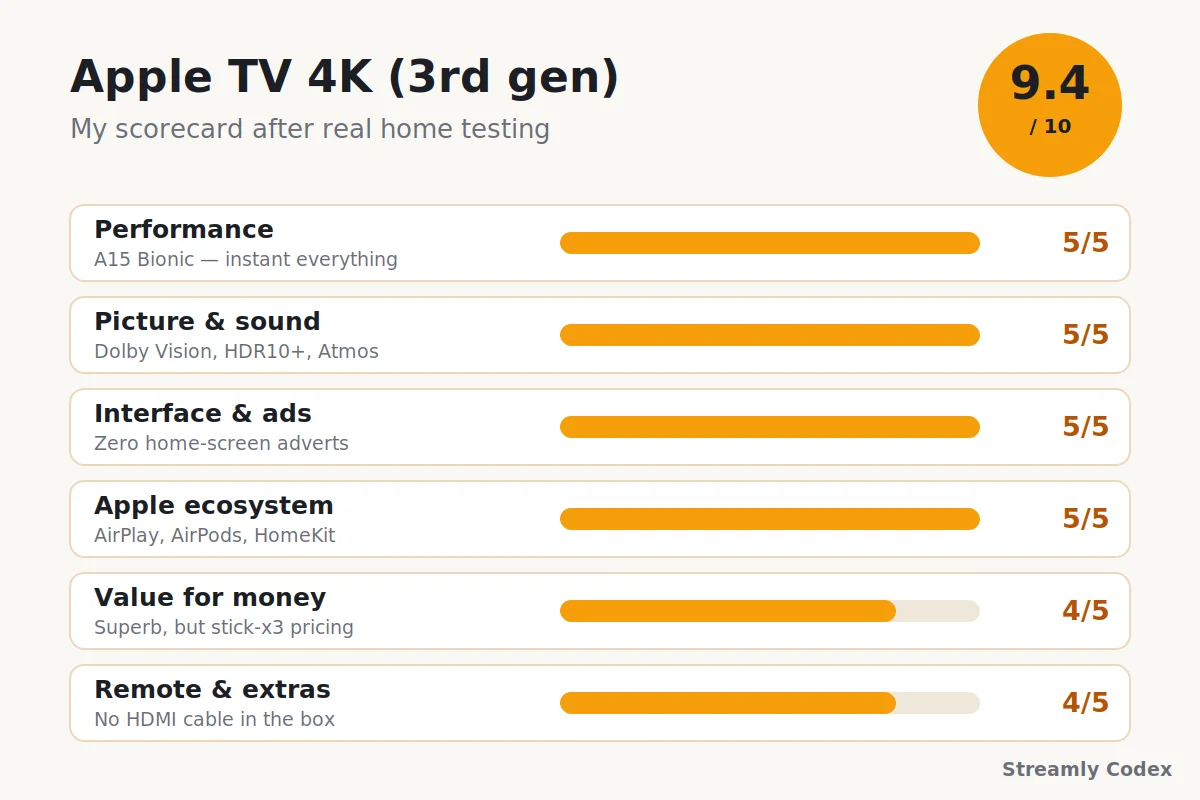
| Category | Score | Why |
|---|---|---|
| Performance | 5/5 | A15 Bionic makes every rival stick feel sluggish. |
| Picture & sound | 5/5 | Dolby Vision, HDR10+, Atmos, and frame-rate matching. |
| Interface & ads | 5/5 | Zero home-screen adverts. Genuinely zero. |
| Apple ecosystem | 5/5 | AirPlay, AirPods, HomeKit — it all just clicks. |
| Value for money | 4/5 | Superb, but you’re paying three sticks’ worth. |
| Remote & extras | 4/5 | Lovely remote, though the box skips an HDMI cable. |
Best for: iPhone owners, film nerds with good TVs, ad-haters, and anyone planning to keep one box for five-plus years.
The Big 2026 Question: Buy Now or Wait?
Let’s deal with the elephant first, because it changes the advice. The current Apple TV 4K is the 3rd generation, from late 2022. Apple-watching outlets like Bloomberg and MacRumors expect its replacement around September 2026. The hardware is reportedly finished, held back while Apple gets its smarter Siri ready.
The rumoured upgrades: an A17 Pro-class chip (a big jump for gaming and Apple’s AI features), Wi-Fi 7, and the same familiar design. Nothing is official until Apple says so, and these dates have slipped before.
So here’s how I’d play it, honestly:
- Casual streamer, found a discount? Buy now. The A15 model is already overkill for Netflix and iPlayer, and it will feel fast for years.
- Care about Apple Intelligence, next-gen gaming, or smart-home tech? Wait for autumn. The new chip is the whole point for you.
- Bargain hunter? Also wait — when the new one lands, this generation tends to get properly discounted. That’s when 9.4/10 hardware becomes a steal.
Who Should Actually Buy One?
It earns its price if you:
- Own an iPhone, iPad, or Mac — the tricks multiply fast
- Watch films properly and own a decent 4K HDR TV
- Are sick of home screens plastered with sponsored rows
- Run HomeKit gear, or plan to
- Keep devices for many years and want one that lasts
Your money is better spent elsewhere if you:
- Only ever open Netflix and YouTube — a £35 stick manages that
- Live in an Alexa household top to bottom
- Have zero Apple devices and no interest in changing that (it works fine, you’ll just miss the best bits)
- Want the newest silicon — see the waiting advice above
“But My TV Is Already Smart” — Fair Question
I get this one constantly, and it deserves a straight answer rather than a sales pitch.
Built-in TV software is where streaming goes to feel old. The chips inside most tellies are slow the day you buy them. The menus grow adverts over time, and the maker loses interest in updates after two or three years. The panel might last a decade; the software won’t.
An Apple TV takes over the whole job. Same TV, but apps now open instantly and the home screen stays clean. Updates keep coming long after your TV brand has moved on. It also becomes the one remote your household uses, which sounds trivial until you live it.
If your smart TV still feels quick and doesn’t nag you with promos — genuinely, keep using it. Mine didn’t, and this box fixed every complaint at once.
Apple TV 4K Specs (2026)
| Spec | Details |
|---|---|
| Model | 3rd generation (late 2022) — still current in mid-2026 |
| Chip | Apple A15 Bionic |
| Resolution | Up to 4K at 60fps |
| HDR | Dolby Vision, HDR10+, HDR10, HLG |
| Audio | Dolby Atmos, plus spatial audio with AirPods |
| Storage | 64GB (Wi-Fi) or 128GB (Wi-Fi + Ethernet) |
| Networking | Wi-Fi 6; Gigabit Ethernet and Thread on the 128GB model |
| Smart home | HomeKit and Matter hub |
| Software | tvOS 26 today; tvOS 27 arrives this autumn |
| Remote | Siri Remote, USB-C charging |
| UK launch price | £199 (64GB) / £249 (128GB) |
Worth noting: that A15 is an iPhone 13 chip inside a TV box. It’s why nothing about this device ever feels like it’s trying.
Inside the Box — and What’s Missing
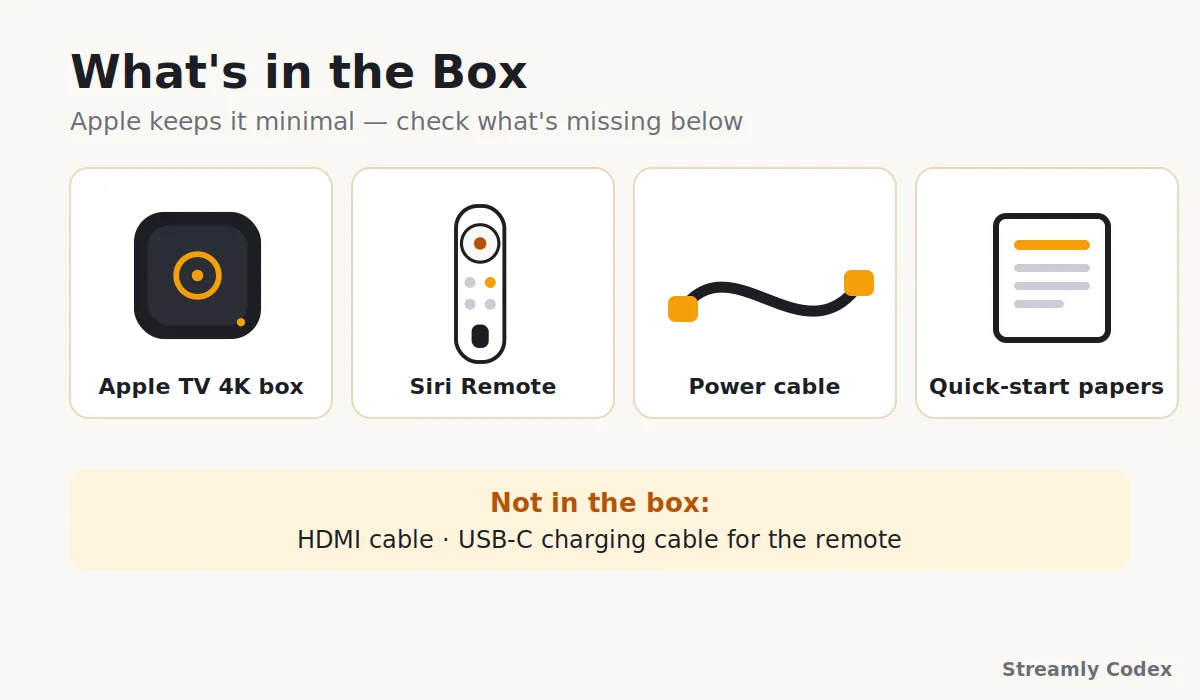
Apple’s box is famously minimal. You get:
- The Apple TV 4K itself
- Siri Remote
- A power cable
- The usual slip of paperwork
Two things are missing, and at this price they shouldn’t be. There’s no HDMI cable. Order one with it if you don’t have a spare — any decent high-speed cable does the job. And the remote charges over USB-C, but no charging cable is included — a phone cable works fine.
Small print for the annoyed: the remote’s charge lasts around two months, so the missing cable stings less than it sounds.
Setup: The iPhone Party Trick
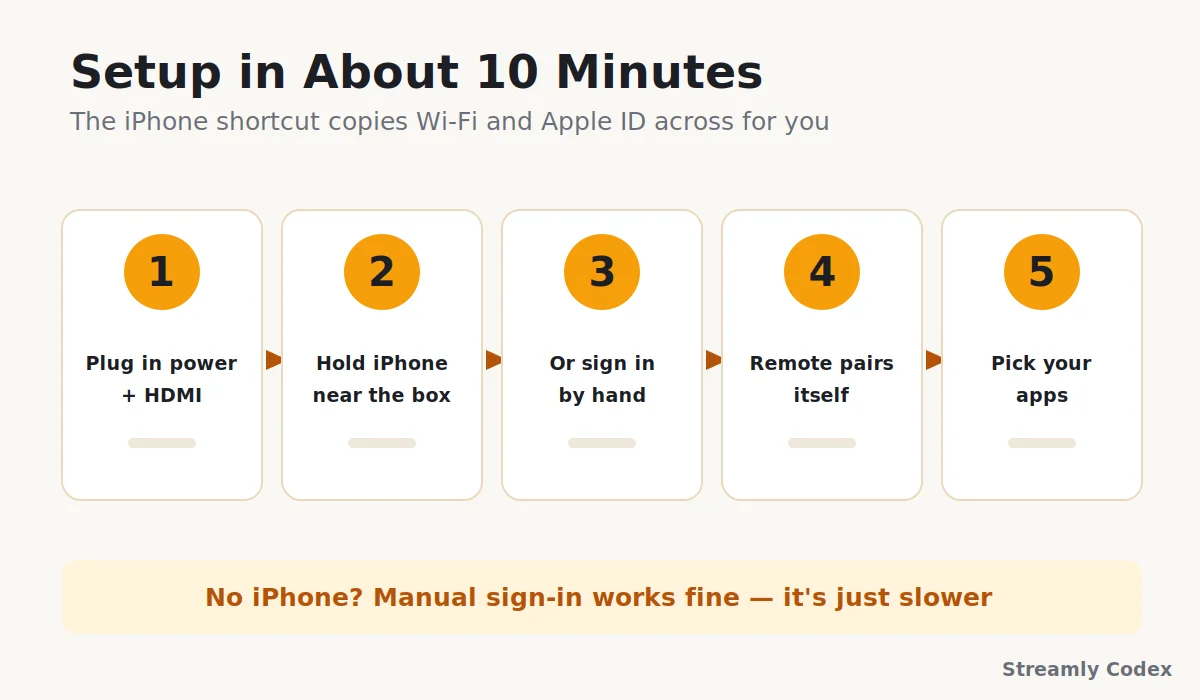
This was the fastest setup I’ve done on any streamer, and it’s mostly because of one trick. Plug in power and HDMI, and when the screen asks, just hold an unlocked iPhone near the box. Wi-Fi password, Apple ID, settings — all copied across on their own. Mine took about ten minutes including app installs on my Samsung TV 32inch.
No iPhone? You sign in with the remote the old-fashioned way. Slower, works fine.
One bonus worth doing: the colour balance tool uses your iPhone’s camera to tune the picture to your specific TV. It takes a minute and it’s a genuinely clever touch.
I’ve written a full step-by-step Apple TV setup guide if you want screenshots for each stage.
Speed: Why Owners Rave About It
Every streaming stick I’ve tested has a moment where it pauses to think. This box simply doesn’t. Apps open before your thumb leaves the button. Scrolling never stutters. Search results appear as you type, not after.
Over [09 months] on my 150 Mbps connection, with 12-odd devices on the network, I haven’t seen it drop a 4K stream once. Not during football, not during a household video-call pile-up, not ever. The 128GB model’s Ethernet port makes that even more solid if your Wi-Fi is flaky.
Is that speed worth £100 over a stick? On day one, maybe not. In year four — when budget sticks have slowed to a crawl and this thing still feels new — the maths starts making sense. That’s the real case for the A15: headroom you grow into, not out of.
Picture and Sound: Built for Film Nights
The format list covers everything that matters — Dolby Vision, HDR10+, HDR10, HLG, and Dolby Atmos out to a soundbar or receiver. On my Samsung TV 32inch, Dolby Vision films look the way the studio meant them to. Shadows keep their detail, and bright scenes glow without washing out.
The feature film fans should care about is frame-rate matching. Turn it on once, and the box plays each film at its native frame rate instead of forcing one setting on everything. Movies keep their proper film-like motion — no soap-opera smoothness, no juddery pans. Cheap sticks either skip this or hide it badly.
AirPods owners get a bonus: pair them for private late-night listening, complete with head-tracked spatial audio. It sounds like a gimmick. It isn’t — I use it more than the soundbar after 10pm.
Any weakness? Only that a basic 1080p TV can’t show most of this. This box belongs on a proper 4K HDR screen.
Apps in the UK and Europe
tvOS has been around long enough that app gaps are basically history. Everything I use is present and polished:
- Netflix, Prime Video, and Disney+
- YouTube and Spotify
- BBC iPlayer, ITVX, Channel 4, My5, and Now for UK catch-up
- DAZN and Rakuten TV in supported countries
- The Apple TV app itself, for rentals and Apple TV+ originals
Across the EU the big global names work everywhere. Country-specific catch-up apps vary, so check the App Store for your local must-have before buying. UK readers can relax — the catch-up lineup here is complete.
One naming note that confuses everyone: “Apple TV” is the box, and Apple also calls its streaming service Apple TV now. You do not need the subscription to use the box. More on that in the FAQs.
The Ad-Free Home Screen (Yes, Really)
Open a Fire TV and count the sponsored tiles. Open this, and there’s a grid of your apps on a quiet background. That’s it. No banner takeovers, no promoted casino games, no shopping rows.
After months with it, this is the feature I’d miss most. A TV you switch on and nothing shouts at you has become weirdly rare. Apple charges more up front instead of selling your attention later, and that feels like a fair trade.
tvOS also does profiles properly, so my picks don’t drown in the kids’ cartoons. Voice search on the Siri Remote copes with vague requests, and privacy is stricter than any rival’s — app tracking stays off unless you allow it.
The one gripe: the top row promotes Apple’s own TV app content a little keenly. It’s mild compared with the competition, but it’s not nothing.
The iPhone Tricks That Hook You
This is where the Apple TV stops being a streamer and starts being furniture-level useful — if you own other Apple gear.
- AirPlay: fling video, photos, or your Mac’s screen to the TV in two taps
- iPhone as remote: with a proper keyboard for password fields — bliss
- AirPods: instant private listening with spatial audio
- HomeKit hub: the box quietly runs your smart home and shows camera feeds on the big screen
- FaceTime: use an iPhone as the camera and take calls on the TV
- Fitness+: workouts on the big screen with your Watch stats overlaid
Android household? Everything core still works — streaming, voice search, the lot. You’re just skipping the party tricks, which honestly are half the reason to pay Apple prices. Factor that in.
See Apple TV 4K Models on Amazon →
Gaming: A Genuine Bonus
Pair a PS5 or Xbox controller over Bluetooth and Apple Arcade turns this into a tidy casual console. The A15 handles arcade titles without breaking a sweat. Family games on the big screen have had far more use in my house than I expected.
Keep expectations sane — it’s not a console replacement, and the rumoured next model is the one aiming at serious gaming. As a throw-in feature on a streamer, though, nothing else at this price comes close.
What It Costs in Europe (2026)
Apple pricing is refreshingly boring: £199 for the 64GB model and £249 for the 128GB in the UK, roughly €229 and €299 across much of the eurozone. Unlike Fire TV sticks, it almost never crashes to half price. Discounts of £15–£30 appear at the usual retailers a few times a year, and as I write this the 64GB is sitting around £179 during sales.
Three rules I’d follow in mid-2026: never pay above RRP from a marketplace seller. Treat any £20+ discount as a good deal, not a wait-for-better. And remember the autumn effect — if the new model lands in September, this generation’s price should soften nicely.
For the full breakdown (cheapest retailers, the refurbished store trick and when prices drop), see our Apple TV 4K price guide for Europe.
For the full breakdown (cheapest retailers, the refurbished store trick and when prices drop), see our Apple TV 4K price guide for Europe.
Check the Live Apple TV 4K Price →
64GB or 128GB: Pick in 60 Seconds
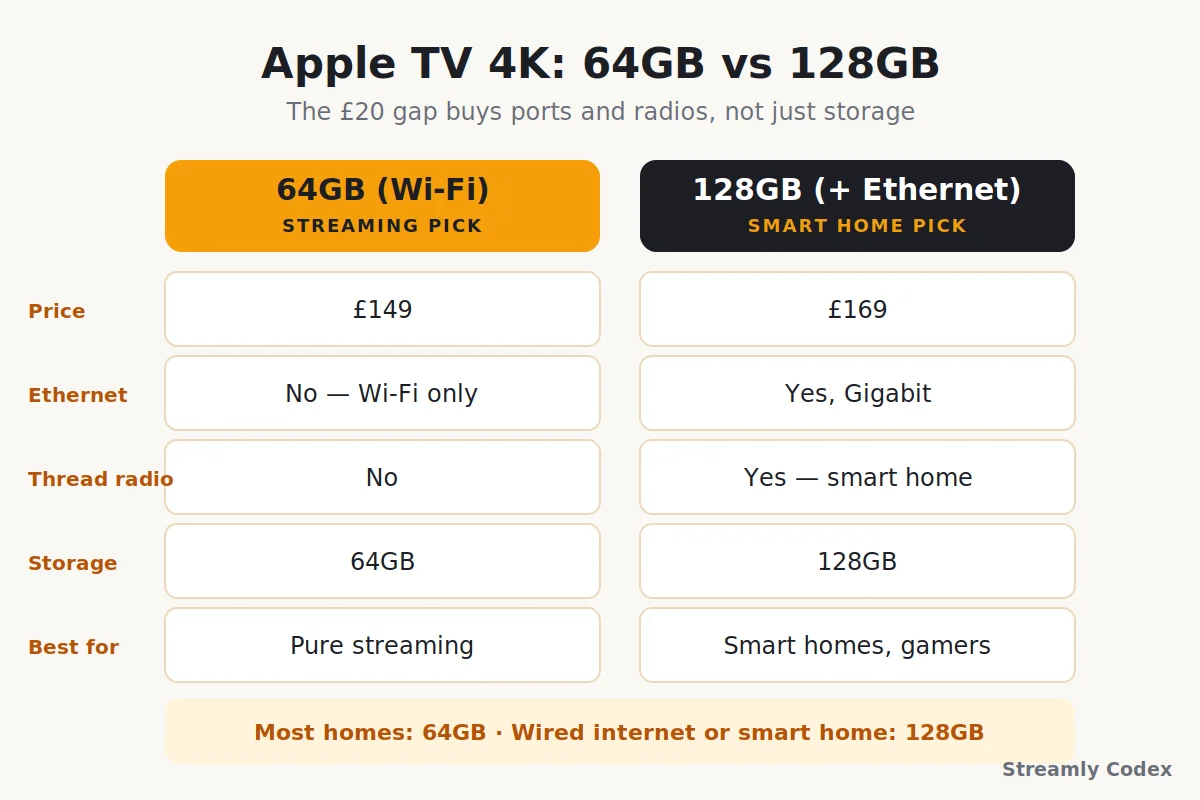
The £50 gap buys more than storage, which is why this choice trips people up:
| Question | 64GB (Wi-Fi) | 128GB (Wi-Fi + Ethernet) |
|---|---|---|
| Price | £199 | £249 |
| Wired internet | No | Yes, Gigabit |
| Thread smart-home radio | No | Yes |
| Storage for apps & games | Plenty for most | Headroom for gamers |
| Best for | Pure streaming homes | Smart homes, shaky Wi-Fi, gamers |
My advice runs against the money-saving grain: streaming-only homes should happily take the 64GB. But if you have smart-home plans, or a router on the far side of the house, spend the extra £50. The 128GB’s Ethernet and Thread radio make it the better buy — that’s the one running my living room.
Apple TV 4K vs Fire TV Stick 4K Max
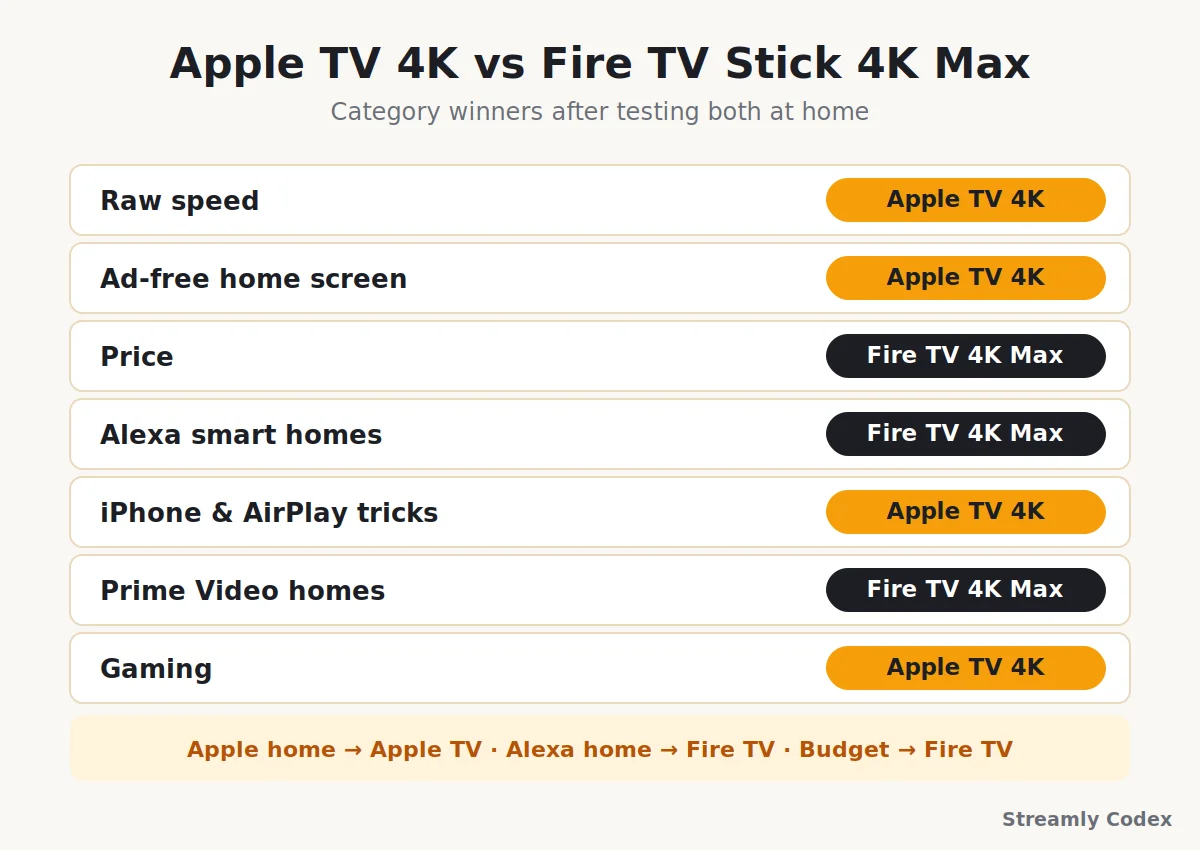
The £60 stick against the £199 box. It’s the comparison readers ask me about most, and the spec sheet won’t settle it:
| Category | Winner | Why |
|---|---|---|
| Raw speed | Apple TV | An iPhone chip against a stick chip — no contest |
| Ad-free home screen | Apple TV | Zero promos versus a wall of them |
| Price | Fire TV | Less than half the cost, often on sale |
| Alexa smart homes | Fire TV | Echo and Ring tie-ins run deep |
| iPhone & AirPlay tricks | Apple TV | AirPods, HomeKit, FaceTime, Fitness+ |
| Prime Video homes | Fire TV | Built around Amazon’s world |
| Gaming | Apple TV | Arcade plus proper controller support |
If budget rules, the stick genuinely delivers. If experience rules, the gap is wider than the spec sheets admit. I’ve reviewed the Fire TV Stick 4K Max in full, and my Fire TV vs Apple TV comparison settles the tie-breakers.
Coming from Google’s side instead? Against a Chromecast with Google TV or the newer Google TV Streamer, the Apple TV wins on speed and polish. Google wins on price, and on phone casting for Android homes — same ecosystem logic, different accent.
Pros and Cons
✔ What I like
- Fastest streamer I’ve used, by a distance
- Not a single advert on the home screen
- Dolby Vision, HDR10+, Atmos, frame-rate matching
- AirPlay, AirPods, and HomeKit hub built in
- Complete UK catch-up app lineup
- Will still feel quick in five years
✘ What I don’t
- Costs as much as three budget sticks
- No HDMI cable or remote cable in the box
- Best tricks need other Apple devices
- Apple promotes its own TV content up top
- A newer model is expected this autumn
How I Tested This Device
Everything above comes from [09 months] with the Apple TV 4K running my main TV, not from a weekend with a press unit:
- Daily viewing on a Samsung TV 32inch, with spot checks on an older 1080p set
- Long stretches of Netflix, Disney+, BBC iPlayer, ITVX, and YouTube
- Dolby Vision and Atmos playback through a soundbar, plus AirPods spatial audio
- Setup and AirPlay tests with both an iPhone and an Android phone
- HomeKit hub duties and Siri voice search most days
- A home network of 12-plus devices on a 150 Mbps connection
Specs were checked against Apple’s official pages before publishing. The buy-or-wait advice reflects public reporting as of 8 July 2026 — if Apple announces the new box, I’ll update this review the same week.
Apple TV 4K: Your Questions Answered
Is the Apple TV 4K worth it in 2026?
For iPhone households, film lovers, and anyone who hates ads — yes, comfortably. It’s the fastest, cleanest streamer on sale. Budget-first buyers get better value from a Fire TV or Chromecast stick.
Should I buy an Apple TV 4K now or wait?
A new model is expected around September 2026 with a much faster chip. Casual streamers can buy today, ideally on a discount. Gamers, smart-home fans, and Apple Intelligence hopefuls should wait a few months.
Why do I need an Apple TV if my TV is already smart?
Because TV software ages badly — slow chips, growing adverts, abandoned updates. An Apple TV makes the same panel feel instant and clean, and it keeps getting updates for years.
Do I need an iPhone to use it?
No. It works fully as a standalone streamer. An iPhone just unlocks the extras — instant setup, AirPlay, colour calibration, and the remote app.
Does Apple TV 4K need a subscription?
No. The box works without any subscription — the confusion comes from Apple’s streaming service also being called Apple TV. That service is optional, like Netflix.
Apple TV 4K 64GB or 128GB — which one?
Streaming-only homes: 64GB is plenty. Pick the 128GB for its Ethernet port and Thread smart-home radio, not really for the storage.
Does it support Dolby Vision and Dolby Atmos?
Yes — plus HDR10+ and HLG. Your TV and sound gear need to support these formats too, or you’ll get standard output.
Does Apple TV work with Android phones?
Yes, as a normal streamer. You’ll miss the Apple-only extras like AirPlay from the phone and the automatic setup, but day-to-day streaming is identical.
How long does an Apple TV last?
Longer than any stick. The chip has huge headroom and Apple supports its boxes with software for many years — the 2022 model still gets the newest tvOS in 2026.
Which UK apps does it have?
All the majors: BBC iPlayer, ITVX, Channel 4, My5, and Now, alongside Netflix, Prime Video, Disney+, and YouTube.
Related Guides
- 👉 Best Apple TV Devices in Europe (2026)
- 👉 Fire TV vs Apple TV: Which Should You Buy?
- 👉 Chromecast with Google TV 4K Review
Final Verdict: Expensive, and Worth It
Most streaming devices ask how cheap good-enough can get. The Apple TV 4K asks the opposite question, and after [09 months] I think its answer holds up.
Nothing else combines this speed, this picture quality, and a home screen that treats you like a customer, not an audience for adverts. Add the AirPlay and HomeKit layer for Apple households, and the price stops looking like a splurge. It starts looking like buying once instead of twice.
The honest caveats haven’t changed: it’s overkill for casual Netflix, the best features assume an iPhone nearby, and a newer model is months away. Time your purchase with that in mind.
My final word: the best streaming box you can buy in Europe today — buy it on a deal now, or pounce on the discounts when its successor arrives this autumn.